For most of the last six months, journaling in Amicai has been write-only.
You'd open the app, type out whatever was rattling around — a hard call with your sister, the friend you keep meaning to text back, the thing your mom said on Sunday that you wanted to remember. The extractor would quietly pull out who you mentioned and what about them. And then… nothing. The chat agent never knew. The contact profile never grew. The next time you talked to Amicai about your sister, the conversation started at zero, like the entry never existed.
That's the gap we just closed.
What changed this week
The simplest way to describe it: the journal and the chat now know about each other.
When you open a chat about a contact, the chat agent now reads your last three journal entries about that person before it answers. Not summarized into a generic vibe. The actual entries — what you said, what you felt, what was happening that day. The same way a friend you'd told over coffee would still remember it three weeks later.
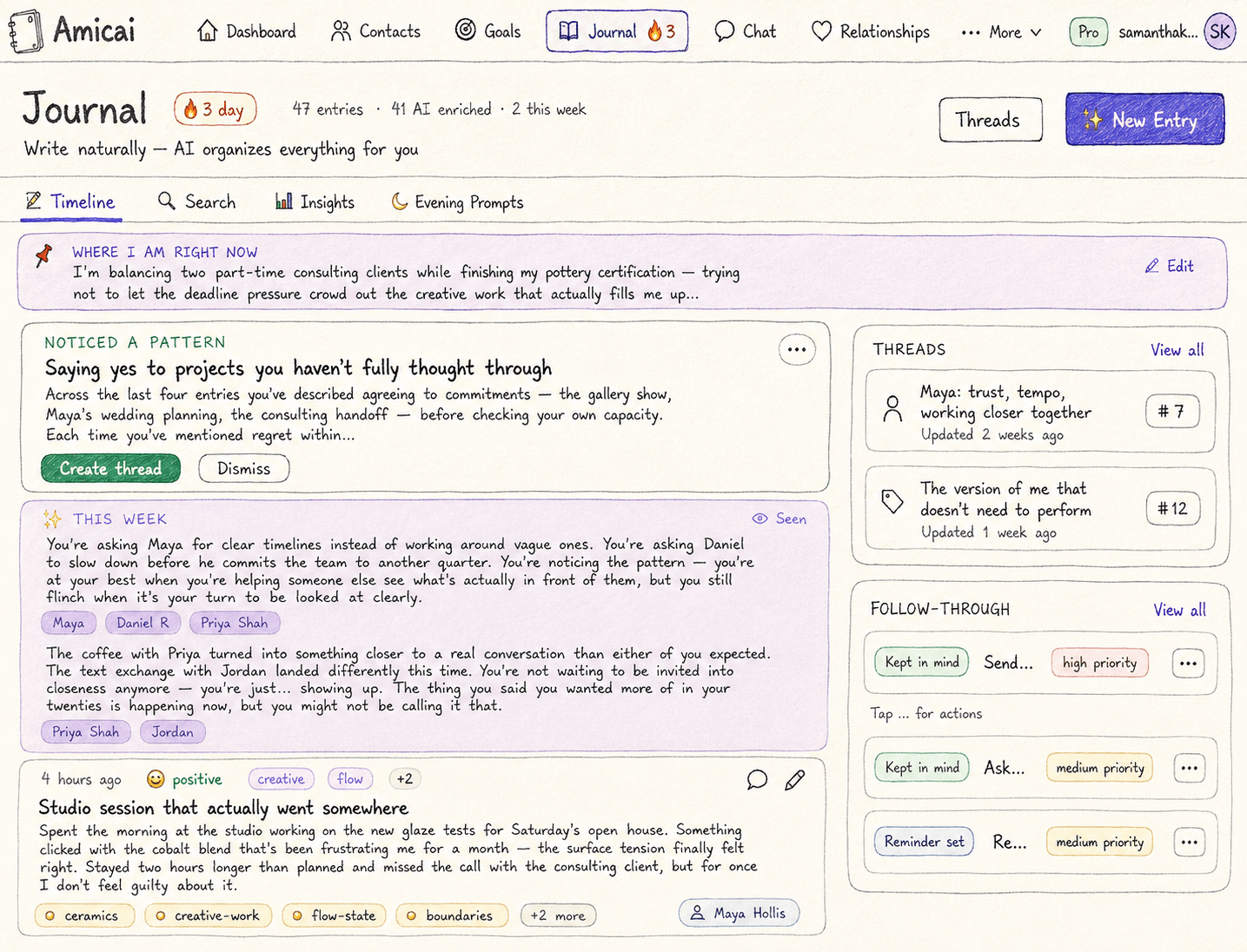
When you write a new journal entry, it now produces structured per-contact insights immediately on the entry you just saved. You see them inline. You approve, edit, reassign, or dismiss them in the same breath as writing the entry. Approved ones land in the contact's profile and start showing up the next time the app surfaces anything about that person.
When you've written about the same person — or the same arc — across several entries, the app quietly notices and offers to connect them. We're calling those threads. People threads (about a contact) and topic threads (about whatever you're working through). Both feed back into the chat in different ways.
And finally, the Soul File — Amicai's living personality profile — now has an "Active Threads" section that shows what you're working through right now. Not a static personality summary. A short, rolling rollup of the live arcs.
That's the whole shape of it. Five connected pieces, one loop.
Why a journal that doesn't talk back is the wrong tool
The thing that actually changes you about journaling — and forty years of journaling research is surprisingly consistent on this — is what becomes visible across entries, not inside any single one.
Anybody who has kept a paper journal knows the feeling. You write the same thing in slightly different words for three months, you flip back one day, and the pattern hits you all at once. The notebook didn't help you see it. The accumulation did.
Most digital journaling apps lose this. Each entry is its own little island. You can search across them, sure, but searching presupposes you remember what you're looking for. The whole point is that you don't — that's why the pattern was invisible in the first place.
Stateless AI is the same failure with extra steps. ChatGPT can give you a sharp response to today's entry; it has no idea what you wrote last week. So even when the model is good, the use of it stays write-only.
We took a different swing. The journal entries don't just accumulate — they accumulate with the chat agent reading along.
The chat-knows-what-you-journaled moment
The first time this lands for someone, it's a little uncomfortable. In a good way.
You open a chat about a friend you've been worried about. You type something general. I'm not sure how to be helpful to him right now. The chat doesn't ask you who he is. It already knows. It mentions the entry you wrote two weeks ago when he first told you the thing. It mentions the one from last week where you noticed you'd been avoiding the conversation. It builds the response on top of all of it.
This is the second half of a post from last night. That one was about the chat agent remembering things you'd told it directly — you mentioned a few weeks ago you needed to decompress. This is the other memory lane. The things you wrote when nobody was on the other end. Those now show up too.
Two streams of context, joining the same river. Together they're the difference between talking to something that responds and talking to something that's been here.
Threads, in the smallest version that actually works
A thread is just a connection between entries. Two flavors:
- People threads — entries you've written that center on the same person. The chat warms its context with the most recent ones whenever you talk about that contact.
- Topic threads — entries that share an arc you're working through. Career change. Dad's diagnosis. Trying to be more present in the evenings. These show up in the Soul File's Active Threads section, so the chat agent has a sense of what you're currently navigating.
You can start a thread manually after any entry. The app also runs a weekly pass that looks for clusters — four or more entries about the same person or topic in two weeks — and surfaces a single suggestion card. Never two at once. Never a pattern you've already turned into a thread, and never one you've already declined in the last 30 days. Suggestion fatigue is the failure mode we worked hardest to avoid.
When a thread goes idle for 30 days, you get a soft prompt to wrap it up — close the loop, optionally write a short reflection on how it landed. After 90 days of no activity it auto-archives, with an undo toast in case the timing was wrong. Concluded threads stop feeding into chat context but stay readable in a Historical Threads view, because the writing is yours and we're not in the business of deleting it.
The whole feature is built around one principle: the threads should help you see the arc, not give you another thing to organize.
What didn't ship
Honest version of the picture.
iOS has the per-entry review card and the core insights flow. The threads UI on iOS is partial — full parity ships in the next sprint, after web has a few weeks of real use to shake out the rough edges. Android stays on the direct-download path and gets threads in a dedicated sprint after iOS proves the patterns.
The weekly nudge ships behind a soft gate. It only fires if the inline review card is hitting healthy approval rates — if people aren't reviewing insights in the moment, a Sunday push to come back and review them would feel like spam. We'd rather find that out and skip the push than ship it and learn the hard way.
The fuzzy contact matcher is conservative on purpose. Silent auto-link only above 0.85 confidence. Between 0.5 and 0.85 you get a "did you mean Sarah Kohler?" prompt before anything saves to her profile. Below 0.5 it offers to make a new contact instead. We'd rather one extra tap than a wrong attribution to the wrong friend.
What it looks like in practice
You write an entry. The review card slides in underneath. Two notes about Marcus, one about your mom. You tap each one, glance at the supporting line from your own writing, hit the check.
Three weeks later you open the chat to ask about Marcus. The first response already includes the things you wrote down. Not as a summary you have to interpret — as context the agent is using to understand the question.
You open the Soul File. There's a small new section near the top. Active threads: the one about your mom's back. The one about being more present in the evenings. The one you're not sure what to call yet, but the app noticed you keep coming back to it.
None of this asks anything of you. It's just there. The journal is doing the part of journaling you couldn't do alone.
The half-line resolution
Most of what we ship at Amicai falls into one of two buckets — the noticing kind, or the connecting kind. This shipment is both. The journal noticed who you were writing about. The threads connected the entries you wrote about them. The chat reads what's been collected.
You don't have to do anything different. The journaling you were already doing is now talking to the rest of the app.
That, it turns out, is the whole point.